Github Action
CI/CD
- Continuous Integration and Continuous Delivery
- automate your build, test and deployment
Components
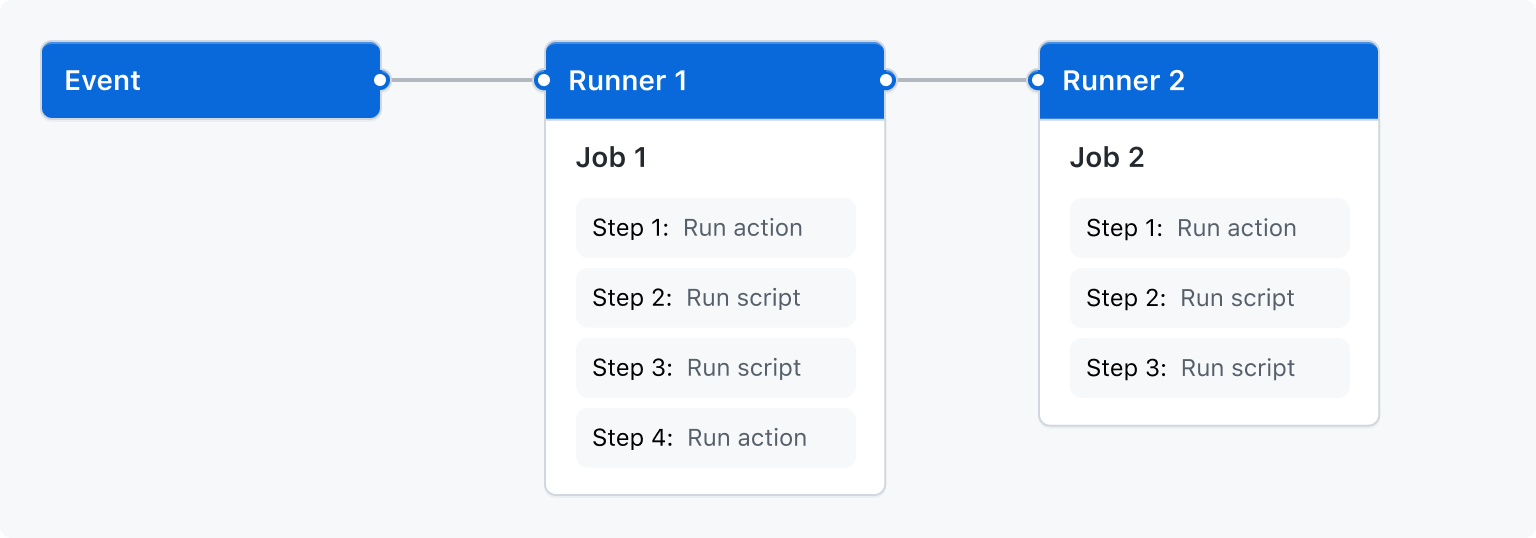
- workflow
- events
- push, pull_request, schedule, workflow_dispatch...
- jobs
- build, deploy...
- actions
- checkout, setup-python...
- runners
- ubuntu linux, MS windows, macos
Quick start
first example
- .github/workflows 에
first.yml을 만들고 아래 내용을 붙여 넣는다.
name: GitHub Actions Demo
on: [push]
jobs:
  Explore-GitHub-Actions:
    runs-on: ubuntu-latest
    steps:
      - run: echo "🎉 The job was automatically triggered by a ${{ github.event_name }} event."
      - run: echo "🐧 This job is now running on a ${{ runner.os }} server hosted by GitHub!"
      - run: echo "🔎 The name of your branch is ${{ github.ref }} and your repository is ${{ github.repository }}."
      - name: Check out repository code
        uses: actions/checkout@v2
      - run: echo "💡 The ${{ github.repository }} repository has been cloned to the runner."
      - run: echo "🖥️ The workflow is now ready to test your code on the runner."
      - name: List files in the repository
        run: |
          ls ${{ github.workspace }}
      - run: echo "🍏 This job's status is ${{ job.status }}."
Build and Test(CI)
python example
name: Python package

on: [push]

jobs:
  build:

    runs-on: ubuntu-latest
    strategy:
      matrix:
        python-version: [3.6, 3.7, 3.8, 3.9]

    steps:
      - uses: actions/checkout@v2
      - name: Set up Python ${{ matrix.python-version }}
        uses: actions/setup-python@v2
        with:
          python-version: ${{ matrix.python-version }}
      - name: Install dependencies
        run: |
          python -m pip install --upgrade pip
          pip install flake8 pytest
          if [ -f requirements.txt ]; then pip install -r requirements.txt; fi
      - name: Lint with flake8
        run: |
          # stop the build if there are Python syntax errors or undefined names
          flake8 . --count --select=E9,F63,F7,F82 --show-source --statistics
          # exit-zero treats all errors as warnings. The GitHub editor is 127 chars wide
          flake8 . --count --exit-zero --max-complexity=10 --max-line-length=127 --statistics
      - name: Test with pytest
        run: |
          pytest
- events
- jobs
- runs-on
- strategy
- steps
deployment(CD)
deploy docker to AWS
- workflow example
name: Deploy to Amazon ECS

on:
  push:
    branches:
      - main

env:
  AWS_REGION: MY_AWS_REGION                   # (1)
  ECR_REPOSITORY: MY_ECR_REPOSITORY           # (2)
  ECS_SERVICE: MY_ECS_SERVICE                 # (3)
  ECS_CLUSTER: MY_ECS_CLUSTER                 # (4)
  ECS_TASK_DEFINITION: MY_ECS_TASK_DEFINITION # (5)
  CONTAINER_NAME: MY_CONTAINER_NAME           # (6)

jobs:
  deploy:
    name: Deploy
    runs-on: ubuntu-latest
    environment: production

    steps:
      - name: Checkout
        uses: actions/checkout@v5

      - name: Configure AWS credentials
        uses: aws-actions/configure-aws-credentials@0e613a0980cbf65ed5b322eb7a1e075d28913a83
        with:
          aws-access-key-id: ${{ secrets.AWS_ACCESS_KEY_ID }}
          aws-secret-access-key: ${{ secrets.AWS_SECRET_ACCESS_KEY }}
          aws-region: ${{ env.AWS_REGION }}

      - name: Login to Amazon ECR
        id: login-ecr
        uses: aws-actions/amazon-ecr-login@62f4f872db3836360b72999f4b87f1ff13310f3a

      - name: Build, tag, and push image to Amazon ECR
        id: build-image
        env:
          ECR_REGISTRY: ${{ steps.login-ecr.outputs.registry }}
          IMAGE_TAG: ${{ github.sha }}
        run: |
          # Build a docker container and
          # push it to ECR so that it can
          # be deployed to ECS.
          docker build -t $ECR_REGISTRY/$ECR_REPOSITORY:$IMAGE_TAG .
          docker push $ECR_REGISTRY/$ECR_REPOSITORY:$IMAGE_TAG
          echo "image=$ECR_REGISTRY/$ECR_REPOSITORY:$IMAGE_TAG" >> $GITHUB_OUTPUT

      - name: Fill in the new image ID in the Amazon ECS task definition
        id: task-def
        uses: aws-actions/amazon-ecs-render-task-definition@c804dfbdd57f713b6c079302a4c01db7017a36fc
        with:
          task-definition: ${{ env.ECS_TASK_DEFINITION }}
          container-name: ${{ env.CONTAINER_NAME }}
          image: ${{ steps.build-image.outputs.image }}

      - name: Deploy Amazon ECS task definition
        uses: aws-actions/amazon-ecs-deploy-task-definition@df9643053eda01f169e64a0e60233aacca83799a
        with:
          task-definition: ${{ steps.task-def.outputs.task-definition }}
          service: ${{ env.ECS_SERVICE }}
          cluster: ${{ env.ECS_CLUSTER }}
          wait-for-service-stability: true
- set this to your preferred AWS region, e.g. us-west-1
- set this to your Amazon ECR repository name
- set this to your Amazon ECS service name
- set this to your Amazon ECS cluster name
- set this to the path to your Amazon ECS task definition file, e.g. .aws/task-definition.json
- set this to the name of the container in the containerDefinitions section of your task definition
deploy docker to azure
- workflow example
name: Build and deploy a container to an Azure Web App

env:
  AZURE_WEBAPP_NAME: MY_WEBAPP_NAME # (1)

on:
  push:
    branches:
      - main

permissions:
  contents: 'read'
  packages: 'write'

jobs:
  build:
    runs-on: ubuntu-latest

    steps:
      - uses: actions/checkout@v5

      - name: Set up Docker Buildx
        uses: docker/setup-buildx-action@7a8b9c0d1e2f3a4b5c6d7e8f9a0b1c2d3e4f5a6b

      - name: Log in to GitHub container registry
        uses: docker/login-action@8c9d0e1f2a3b4c5d6e7f8a9b0c1d2e3f4a5b6c7d
        with:
          registry: ghcr.io
          username: ${{ github.actor }}
          password: ${{ secrets.GITHUB_TOKEN }}

      - name: Lowercase the repo name
        run: echo "REPO=${GITHUB_REPOSITORY,,}" >>${GITHUB_ENV}

      - name: Build and push container image to registry
        uses: docker/build-push-action@9e0f1a2b3c4d5e6f7a8b9c0d1e2f3a4b5c6d7e8f
        with:
          push: true
          tags: ghcr.io/${{ env.REPO }}:${{ github.sha }}
          file: ./Dockerfile

  deploy:
    runs-on: ubuntu-latest

    needs: build

    environment:
      name: 'production'
      url: ${{ steps.deploy-to-webapp.outputs.webapp-url }}

    steps:
      - name: Lowercase the repo name
        run: echo "REPO=${GITHUB_REPOSITORY,,}" >>${GITHUB_ENV}

      - name: Deploy to Azure Web App
        id: deploy-to-webapp
        uses: azure/webapps-deploy@85270a1854658d167ab239bce43949edb336fa7c
        with:
          app-name: ${{ env.AZURE_WEBAPP_NAME }}
          publish-profile: ${{ secrets.AZURE_WEBAPP_PUBLISH_PROFILE }}
          images: 'ghcr.io/${{ env.REPO }}:${{ github.sha }}'
- set this to your application's name
Practical example
Learn more
Etc.
self learning github action : learning lab